

DeepL 26.9.1
DeepL is a complimentary software designed for Windows users, falling under the category of language translation tools. Created by DeepL GmbH, this application supports a variety of languages, making it versatile and accessible.
- Free
- Windows
- macOS
- Android
- iOS
- Nov 3, 2026
c0a01c1361213d505fda9feb17dadd3b2a534a0a90bc86b62bc80e760da333b6VirusTotal report ↗e87c1069b0ddef1c54b0aaf183483453da1efaf1dbb1b877be0bef224b74e079VirusTotal report ↗Screenshots
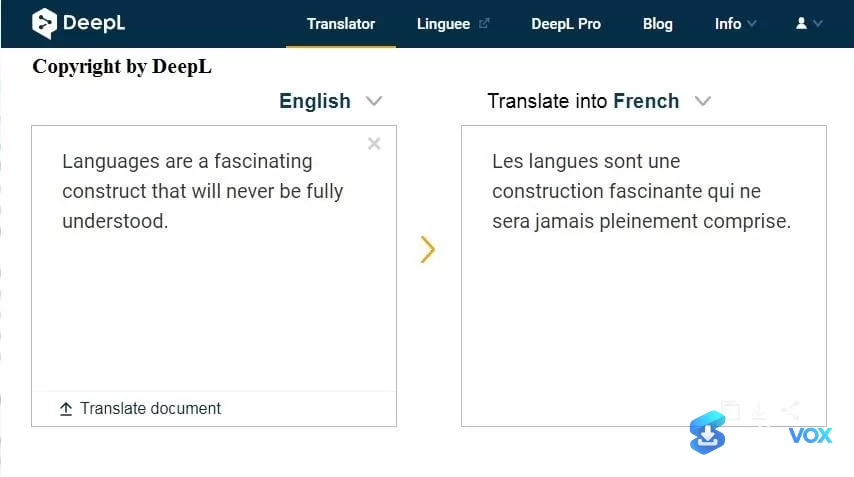
About DeepL
DeepL Translator Download | AI Translation That Beats Google for European Languages
TL;DR Quick Take / Who is this for?
DeepL Translator is an AI-powered translation service that has built its reputation on one claim: it produces more natural, context-aware translations than Google Translate, particularly for European language pairs. Independent benchmarks back this up. In Intento’s testing, DeepL ranked as the top-performing engine in 65% of language pairs, and in DeepL’s own March 2026 head-to-head round, it won 94% of matchups across 16 language pairs against five competitors, including 100% of pairs against Google Translate specifically. The service supports 100+ languages and goes beyond plain text: it translates entire PDF, Word, and PowerPoint documents, offers a built-in glossary for enforcing terminology, and lets you switch between formal and informal tones. The free tier gives you 50,000 characters per month and one document translation, which is enough for casual personal use but runs out quickly for professional work. Paid plans start at $8.74 per month billed annually. The real caveats are language coverage, Google supports over 130 languages to DeepL’s 100+, and user-reported quality declines for some Asian language pairs after recent updates. DeepL is the right pick for translators, businesses, and writers working primarily with European languages who need polished, publication-ready output. It is not the best choice for broad language coverage on a zero budget, or for anyone who needs reliable offline translation.
Quick Info Box
| License Type | Freemium (Free tier; Pro from $8.74/month annual) |
|---|---|
| File Size | About 4.6 MB (Windows desktop installer) |
| OS Compatibility | Windows 10/11 (64-bit), macOS 14+, Android, iOS, web |
| Latest Version | 25.9.1 (desktop, October 2026) |
| Developer | DeepL SE (Germany) |
Key Features & Real-World Usability
DeepL’s core strength is translation quality, not feature bloat. The engine was originally built on convolutional neural networks and has since moved to a transformer architecture trained on high-quality bilingual data from Linguee, which gives it an edge in capturing longer, more natural word sequences. In practice, this means DeepL often produces output that reads like it was written by a fluent speaker rather than a machine, especially for German, French, Spanish, Italian, and Dutch. The desktop app adds practical workflow features that the web version lacks. You can translate selected text in any application with a keyboard shortcut, translate screenshots and image files, and drag PDF, Word, or PowerPoint documents directly into the app for full-document translation. DeepL Write, the company’s AI writing assistant, is integrated into the desktop version and can rewrite your own drafts for grammar, clarity, and tone. The glossary feature lets you lock in preferred terminology, useful for brand names, legal terms, or technical jargon, and the formal/informal tone toggle is genuinely useful for languages where register matters, such as German and French. The free tier is functional but deliberately limited. You get 50,000 characters per month, one document translation up to 5 MB, one glossary with five entries, and one saved translation. Heavy users will hit the ceiling within a week. Data security is strong across all tiers: SOC 2 Type 2 and ISO 27001 certification, TLS encryption, and a commitment not to use your text for model training. Pro plans add enhanced data deletion policies and SSO for teams.
- Best-in-class European accuracy: DeepL consistently outperforms Google Translate for European language pairs in independent benchmarks and blind tests, with a particular edge in nuance and business content.
- Full document translation: Drag and drop PDF, Word, and PowerPoint files into the desktop app or web interface for complete document translation, preserving formatting where possible.
- DeepL Write integration: The desktop app includes DeepL Write, which rewrites your own drafts for grammar, clarity, and tone, useful for non-native speakers polishing professional text.
- Custom glossaries: Enforce preferred terminology across translations, ensuring brand names and technical terms stay consistent. Free accounts get one glossary with five entries; paid plans scale up.
- Formal and informal tone control: Adjust the register of your translation for languages where formality matters, such as German, French, and Japanese.
- Screenshot and image translation: Translate text captured from screenshots or image files directly in the desktop app, without retyping.
- Strong security baseline: SOC 2 Type 2 and ISO 27001 certified, with TLS encryption and a no-training-on-your-data policy on all tiers, including free.
Pros, Cons & Community/User Feedback
User sentiment around DeepL is sharply divided between app store ratings and review platforms, and the split tells you what to expect. On Google Play, DeepL Translate holds a 4.6-star average from more than 434,000 ratings, and on G2 and Capterra it scores 4.6 and 4.7 respectively. Reviewers consistently praise the translation quality for European languages, the speed of the web translator, and the usefulness of the desktop app’s document and screenshot features. One long-term user described it as “the best translation tool ever, very accurate and fast.” The complaints are equally consistent, and they cluster around three themes. First, quality regression: a wave of recent reviews claims that updates have degraded accuracy, with the AI altering meaning or omitting text, particularly for Chinese, Japanese, and Korean. Reddit users echo this, with some professionals describing API terminology translation as “nonsensical.” Second, billing and support: Trustpilot paints a much darker picture, with a 2.6 out of 5 rating driven by complaints about unexpected subscription renewals, rude customer service responses, and refund refusals. Third, app stability: the mobile app has drawn criticism for crashes on launch, login freezes, keyboard input bugs that delete typed text, and a redesigned interface that some users find less intuitive than the old side-by-side translator. The practical takeaway is that DeepL’s core translation engine remains excellent for its strongest language pairs, but the surrounding service experience, billing, support, and mobile app stability, is where frustration accumulates. Users who stay on the free tier or who pay annually and never need support tend to be satisfied; users who hit billing issues or rely on Asian language pairs are more likely to leave negative reviews.
Pros
- Consistently more accurate than Google Translate for European language pairs in independent benchmarks
- Full document translation for PDF, Word, and PowerPoint files
- DeepL Write integration helps non-native speakers polish their own writing
- Custom glossaries and formal/informal tone control add professional-grade consistency
- Screenshot and image translation built into the desktop app
- Strong security certifications (SOC 2 Type 2, ISO 27001) on all tiers, including free
- Free tier requires no credit card and includes 50,000 characters per month
Cons
- Supports 100+ languages versus Google’s 130+, with weaker coverage for Asian and low-resource languages
- Recent user reports describe quality regression for Chinese, Japanese, and Korean translations
- Free tier is limited to 50,000 characters and one document translation per month
- Trustpilot rating sits at 2.6 out of 5, driven by billing disputes and unhelpful customer support
- Mobile app suffers from stability issues, including crashes and keyboard input bugs
- No offline translation mode
- Paid plans are subscription-only, with no lifetime license option
Final Verdict & Safe Download Advice
DeepL Translator earns a strong recommendation for one specific job: producing the most natural, publication-ready translations for European language pairs. If you work with German, French, Spanish, Italian, or Dutch content and you need output that reads like a human wrote it, DeepL is the benchmark, and the independent benchmarks support that claim. The document translation, glossary, and tone controls make it genuinely useful for professional workflows, and the free tier is a legitimate way to test the engine before committing. The caveats are equally clear. Language coverage is narrower than Google’s, recent updates have drawn quality complaints for Asian languages, and the billing and support experience is a recurring source of frustration. Go in with realistic expectations: use DeepL for what it does best, keep an eye on your character usage if you are on the free tier, and do not expect responsive customer service if something goes wrong. If you need broad language coverage or a completely free tool for occasional use, Google Translate remains the more practical default. If you need the best possible European-language output and are willing to pay for it, DeepL delivers.
- Download only from the official DeepL website or official app stores: The legitimate desktop client comes from DeepL’s own domain, and the mobile apps come from Google Play or the Apple App Store. Third-party “DeepL download” sites often wrap installers with adware or bundle unwanted software.
- Verify the installer size and version: The Windows desktop installer is approximately 4.6 MB, and the current desktop version is 25.9.1. A dramatically larger file or an outdated version number is a warning sign.
- Check system requirements before installing: The desktop app requires Windows 10 64-bit (all editions) or macOS 14, a 2.0 GHz processor, 1 GB of RAM, and 500 MB of free disk space. Older systems will not run it.
- Review the subscription terms carefully: Trustpilot complaints frequently involve unexpected renewals. If you sign up for a paid plan, note the renewal date and cancel before it charges if you do not intend to continue.
- Decline bundled offers during installation: The official installer may offer optional components or upsells. Deselect anything you did not intend to install if you only want the translator.
- Do not rely on machine translation for critical legal or medical content: DeepL is excellent, but it is still machine translation. For contracts, medical documents, or anything with legal consequences, use DeepL as a first pass and have a qualified human translator review the output.
See all Learning programs (1) ›
Key features
- AI-powered translation, especially strong for European language pairs
- 100+ languages supported, text, documents, and more
- Full document translation, PDF, Word, and PowerPoint files
- DeepL Write integration, improves grammar, clarity, and tone of your own drafts
- Custom glossaries, enforce consistent terminology for brands, legal, or technical terms
- Formal/informal tone control, useful for German, French, Japanese, and similar languages
- Screenshot and image translation, translate captured text directly in the desktop app
- Desktop workflow features, translate selected text in any app with a keyboard shortcut
- Strong security baseline, SOC 2 Type 2, ISO 27001, TLS encryption, and no training on your data
- Free tier available, 50,000 characters/month and one document translation, no credit card required
- Paid Pro plans, from $8.74/month billed annually; add enhanced data deletion and SSO for teams
Frequently asked questions about DeepL
What is DeepL Translator?
Is DeepL Translator free?
Is DeepL better than Google Translate?
How many languages does DeepL support?
Can DeepL translate documents?
Does DeepL work offline?
What is DeepL Write?
What are glossaries and tone controls?
Is DeepL safe for private or business text?
What are the main complaints about DeepL?
Where should I download DeepL?
What are the desktop system requirements?
Should I use DeepL for legal or medical translation?
Versions
| Version | Release date | Platform | File size | |
|---|---|---|---|---|
| DeepL 26.9.1 Latest version | Oct 3, 2026 | WindowsmacOSAndroidiOS | 4.6 MB | Download |
Comments about DeepL
No comments yet. Share your experience with this program!